Help center
If you can’t find the answer you’re looking for, our team is here to help.
from how they work to their installation..
If you can’t find the answer you’re looking for, our team is here to help.
Capacitive soil probes :  and
and 
It’s simple: we provide a detailed, step-by-step installation guide to walk you through the process.
The probe should be installed in a location that is representative of your field and the irrigation zone you want to monitor.
The goal is to choose an area that is neither too dry nor too wet, so it accurately reflects the average soil behavior.
This probe will serve as the reference point for your irrigation data, so it’s important to install it carefully in the right location.
In some cases, it can also be useful to install an additional probe in a specific or atypical area (yield loss, variability, or growth anomalies).
This allows you to compare data with your main reference probe and better understand how your soil behaves.
Yes, the probe can be installed at any time of year.
However, installation at the beginning of the season is recommended to better track historical soil trends and water needs over time.
It’s also easier to install when the soil is not too dry, so planning installation in spring is often ideal.
For perennial crops (orchards, vineyards, etc.), there is no need to remove the probe. It can remain in place for several years.
For annual crops, probes should be installed before planting and removed before harvest to prevent damage from field equipment.
The probes are designed to be robust and withstand handling.
Yes, the probe works perfectly with ground cover.
It measures the soil’s water status directly, regardless of surface conditions.
You still get reliable visibility into what’s happening below ground, even with vegetation cover.
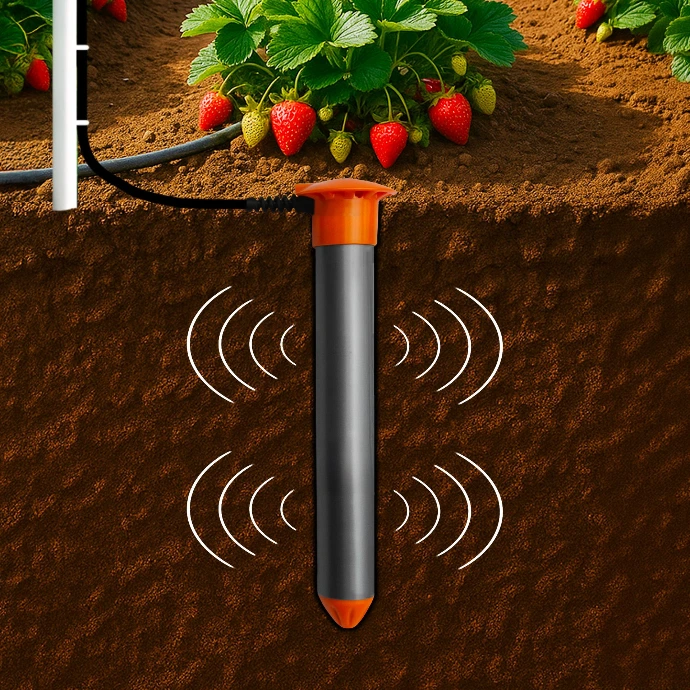
Each probe sensor emits an electromagnetic field around it (illustrated by the waves in the diagram). This field “scans” the surrounding soil within a given radius. Depending on how much water is present, the returned signal changes.
The wetter the soil, the stronger the response. The probe analyzes these variations to accurately measure both soil moisture and temperature.
Sensors are positioned at different depths to track water movement throughout the soil profile.
Regular data readings from each sensor help you understand where and how water is stored in the soil.
Soil is a porous medium that acts as a natural water reservoir for plants. Its storage capacity depends on its texture, this is known as the Plan Available Water capacity.
Both probes measure soil moisture and temperature.
The main difference lies in their configuration:
- HydraScout : a multi-depth probe with several sensors, designed to monitor moisture and temperature across different soil horizons.
- HydraSolo : a compact probe with a single sensor, ideal for simpler, targeted monitoring.
Pour simplifier on peut dire qu'HydraScout a un format parfaitement adapté à un usage en agriculture, alors qu'HydraSolo est plus compacte et polyvalente, ce qui est précieux en zone urbaine
Yes, the probe works in all soil types, including clay, silt, and sandy soils.
Because each sensor operates independently, the probe adapts well to heterogeneous soils and provides reliable measurements at different depths.
You can fine-tune the calibration directly in Odusol by selecting a soil class or by entering the soil texture (clay, silt, sand).
If needed, your advisor can help you configure the probe to match your soil conditions as accurately as possible.
On average, about one probe per hectare is recommended.
However, proper setup should be based on irrigation zones rather than strictly on area. The goal is to equip each homogeneous zone (same soil, crop, and irrigation strategy) with a representative probe.
This ensures you get reliable data to manage irrigation at the right place and at the right time.
If you’re unsure, your advisor can help you determine the optimal number of probes for your operation.
The probe is supplied with a 5 meter cable as standard.
It is possible to add 10-meter extension cables, with up to 6 extensions between the probe and the datalogger.
This allows for a maximum total cable length of up to 65 meters.
The probe does not have its own power supply. It is a passive measurement device, powered and activated by the communication unit (datalogger).
Under standard operation, the datalogger queries the probe every 15 minutes to take a measurement.
In this configuration, the datalogger’s batteries provide an average lifespan of around 3 years.
In some cases, especially in urban environments where measurements are taken less frequently, battery life can exceed 5 years.
HydraScout and HydraSolo probes require no specific maintenance.
Once properly installed, they can operate reliably for multiple seasons without any particular intervention.
This reliability is also why we offer extended warranty periods on our devices.
Check that the probe is properly connected to the unit (M12 connector securely attached) and that the unit is powered on (switch set to ON).
Also make sure the area has adequate network coverage (GSM or LoRaWAN, depending on your setup).
You can also refer to our step-by-step installation guide to confirm that every step was completed correctly.
If the issue persists, please contact us using the form below.
During installation, a slurry mixture (fine mud) is used to ensure proper contact with the soil. This can cause elevated moisture readings on the sensors immediately after installation.
A stabilization period of a few days is then needed for moisture levels to balance out with the surrounding soil.
Right after installation, check for this pattern in your data curves to confirm the probe has been properly installed and is making good contact with the soil.
If one of the sensors shows abnormally low moisture readings right after installation, this may indicate an air pocket (insufficient slurry) or high stone content near the sensor.
In this case, we recommend reinstalling the probe.
If you're unsure, refer to our installation guide to confirm proper setup.
The probe can be installed either using a 40mm diameter drill bit mounted on a sufficiently powerful cordless hammer drill, or with a 40mm diameter manual auger, the preferred method, as it causes less disturbance to the surrounding soil.
The depth will depend on the probe format you've chosen, based on your crop type.
Dig a hole matching the length of the probe. For example, for a 100 cm probe, dig a hole of the same depth 100 cm.
Find all the detailed steps in our complete installation guide.
No, moving the probe does not damage the device. However, since measurements are now taken in a new environment, the data will differ.
A relocation is essentially equivalent to a new installation. We recommend reviewing the installation guide again, then allowing a few days of observation to verify measurement quality after repositioning.
On the Odusol platform, changing the probe's location also requires updating the soil texture for each sensor. We recommend notifying your advisor directly through Odusol or by email.
Please note : changing the soil texture will apply the new calibration to all data, including historical data. This will also affect management thresholds, which will need to be adjusted accordingly.
HydraScout and HydraSolo probes come with a 5 year warranty from the date of purchase (including a 2 year legal warranty plus a 3 year extension).
This warranty covers all failures occurring under normal use of the probe.
Communication units are covered by a 2 year warranty from the date of purchase.
You can contact our team directly through your customer portal, or reach out to the retailer where you made your purchase.
Either way, we're here to support you until your issue is fully resolved.
The warranty covers failures occurring under normal use of the probe. Damage resulting from external causes, such as farm equipment running over the probe or a damaged cable is not covered.
Similarly, prolonged exposure to high heat (for example, direct sunlight or being left in a closed vehicle) can damage the probe and is not considered normal use..
That said, in these situations, our team is still here to help: whenever possible, we'll offer a suitable repair solution.
The HydraConnect Datalogger
No, installation is quick and easy.
You can follow the setup steps in our detailed installation guide.
No, there's no need to buy one. Connectivity is included, we provide the SIM card and manage the subscription for you.
It automatically connects to the most suitable network to ensure reliable data transmission.
Yes, up to 4 probes can be connected to a single unit.
It is also possible to connect other types of sensors depending on your setup.
It's also possible to connect other types of sensors depending on your setup. In this case, we recommend speaking with an advisor to help validate your installation plan.
The unit should be placed close to the probe, ideally mounted up high on a post within the field, or directly on a tree if possible.
Cable ties are included in the box to make mounting easier.
In some cases (sports facilities, urban areas), the unit can be installed inside a utility box to remain discreet (see next point).
Connecting the unit to the probe is simple, using screw-on connectors.
Yes, the unit can operate inside a valve box or in an underground installation, provided it's positioned close enough to the surface to ensure reliable data transmission.
You should also make sure that nearby metal components don't interfere with the signal.
In areas with no mobile network coverage ("dead zones"), we offer alternative solutions using our LoRa-enabled probes.
If you're unsure about your setup, our team can help you validate the installation.
The unit is compatible with standard protocols (SDI-12, RS485) for connecting to probes.
Data is then automatically transmitted via the mobile network (LTE-M).
Depending on conditions, alternatives such as LoRaWAN or satellite connectivity can also be used.
Yes, the unit is fully waterproof.
It's designed to keep working even after several days of flooding.
Yes, the unit is built to withstand temperatures ranging from -30°C (-22°F) to +60°C (140°F).
First, check that the batteries are correctly installed and in good condition; if needed, replace them with new batteries suited to your model.
If the problem persists, contact your retailer or reach out to us directly through your customer portal.
First, check that the probe is properly connected to the unit: the connector should be well positioned and fully screwed in.
Also make sure there's sufficient network coverage in the area (you can check with your phone to see which carrier gets the best signal near the unit).
In most cases, the problem comes from a lack of network coverage. If the coverage is adequate, restarting the unit may resolve the problem.
In most cases, the issue is due to a lack of network coverage. If coverage is adequate, restarting the unit may resolve the problem. You can also refer to the installation guide to verify that the setup is correct.
If the problem persists, open a support ticket describing the situation and including the GPS coordinates of your field.
The Datalogger are guaranteed for 2 years from their date of purchase by our Distributor.
You can reach out to the retailer where you made your purchase.
They will contact our team directly on your behalf.
Either way, we're here to support you until your issue is fully resolved.
The decision-support tool: 
The content of the subscription depends on the plan you choose (features, support, level of guidance).
You can view the details of each plan and compare options directly on the dedicated Odusol page.
The Odusol subscription comes with a 1 year commitment.
Renewal is not automatic: we'll reach out to you as your renewal date approaches to offer you the option to renew your subscription.
The subscription is taken out for a 1 year period and cannot be canceled during that time.
Once this period ends, you're free to choose not to renew your subscription.
Yes, you can upgrade your initial subscription to get more support and additional features.
You don't need to wait until the end of the year to do so simply contact your HSTI-France advisor through your customer portal and complete the additional portion of your subscription.
Odusol is accessible through a secure online portal, directly from your web browser.
👉 Log in using the following link:
https://hsti.tago.run/auth/login
Simply enter your username and password to access your data.
You can also view your data from the field using the mobile app (see next question).
Yes. You can access Odusol from your smartphone or tablet.
A dedicated mobile app, TagoRun, is available on iOS and Android, making it easy to view your data directly from your fields.
Simply:
- Download the TagoRun app
- Enter the domain name "hsti"
- Log in with your username and password
Yes. Odusol keeps a history of your data, allowing you to track changes in your soil's water status over time and analyze your practices.
You can also export your data in CSV or Excel format for easy use in spreadsheets.
Yes. You can grant third parties (advisor, technician, staff) access to your data to facilitate monitoring and decision-making.
To do so, simply submit a request to your advisor. Access is secure and controlled.
Yes. Odusol provides several tools to support you:
- Built-in help directly within the interface: click the "?" icons to understand the data and how to use it
- A user guide available in your customer portal
- A messaging feature to contact your advisor whenever you need
This way, you can work independently while still having access to support at any time.
Yes. With Odusol Conseil, you're not just relying on data, you're supported by a dedicated agronomic expert.
Your advisor analyzes your situation and field data to provide you with concrete, tailored recommendations, along with a weekly bulletin.
Odusol also gives you access to powerful decision-support tools:
- Analysis of available water capacity by depth
- Historical comparisons across different periods
- Customizable water and temperature alerts
- Integration of additional sensors (via API)
👉 This gives you the best of both worlds: human expertise plus data precision, so you can irrigate with greater confidence and at the right time.
Odusol only uses the data necessary for the proper functioning of the decision support tool: data from sensors, agronomic information, and parameters related to your fields. This data is processed in compliance with GDPR regulations.
Odusol is our decision support tool for managing your irrigation.
It centralizes data from your sensors and turns it into simple indicators to help you irrigate at the right time, with the right amount.
No. Odusol can also integrate data from other partner tools, depending on your configuration.
To explore this option, you can reach out to your advisor through your customer portal, or discuss it with a sales representative early in your project.
Yes. Odusol is based primarily on your soil's characteristics (texture, available water capacity, etc.), which makes it relevant regardless of the crop.
With the Odusol Conseil option, you also benefit from personalized agronomic recommendations that take into account both water management and the specifics of your crops.
Check that your equipment is properly connected and that your account is correctly set up.
An activation email was sent to you when your account was created: please make sure this step has been completed.
Yes, you can set up alerts based on your needs (water thresholds, specific conditions, etc.).
This feature is available with the Odusol Conseil plan.
Explanations are available directly within the interface and your customer portal.
You can also contact your advisor for personalized support.